What if the assistant you already have could:
- Let you pick the exact contacts instead of describing “my past clients” and hoping
- Show a card you can click (person, page, task, profile, billing)
- Preview a marketing draft and choose Update it before anything is saved
- Start from welcome shortcuts (listing package, import contacts, birthdays, and more)
- Tell you clearly when Emma credits are gone — and let you buy more
This is the what’s new companion to the live pillar Meet Emma: Your AI Real Estate Assistant That Never Sleeps. If you have not read that post, start there for the full job list, Ask Emma vs Emma Requests, pricing, and FAQs.
If you tried Ask Emma once and went back to menus, try her again. The last 90 days were about finishing the middle of the job.
Ask Emma still talks to you, not your leads. She still does not book showings. She is rolling out to accounts now, and requests built by our team need the Marketing Assistant add-on.
What shipped (and why it matters)
1. Contact picker
The problem: “My past clients” is not a list of people.
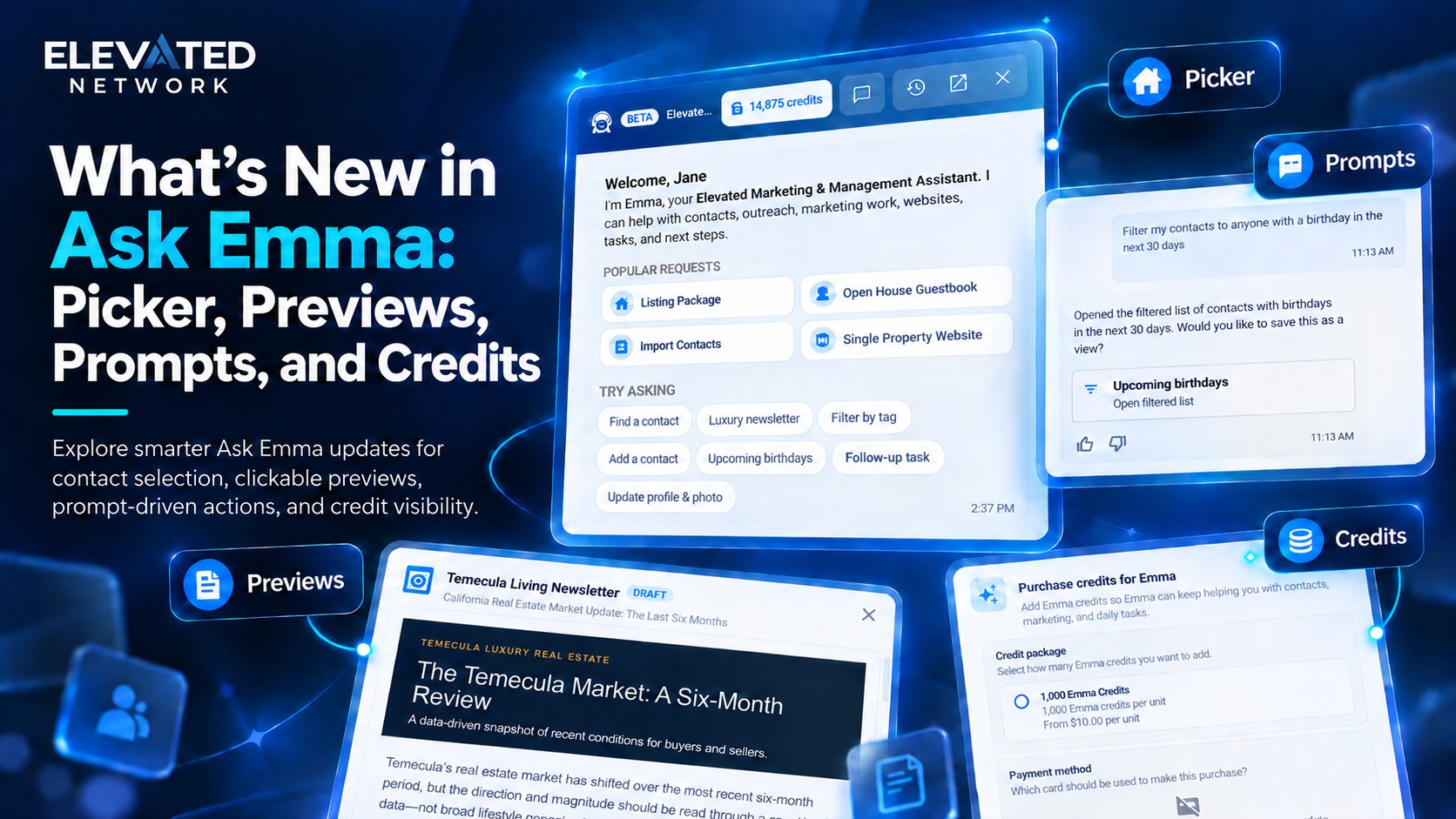
What you can do: Search, select, and confirm contacts in chat. Dedicated search dialog with confirm modes so you do not grab the wrong Sarah.
Example: “Tag these people Past Clients” — then pick or confirm the people.
2. Clickable entity cards
The problem: A paragraph that says “I found a page” does not get you there.
What you can do: Cards for contacts, lists, websites/pages, tasks, profile, and billing. They open the right screen (including slideouts). Profile and billing map to /user/profile and /account/billing. Knowledge and website cards were hardened so you hit fewer 404s.
Example: “How do I update my profile photo?” — then open the profile card.
3. Marketing draft preview and Update it
The problem: Chat that “made a flyer” you cannot see is not useful.
What you can do: Preview the draft, approve or ask for more work, see change receipts / migration status on updates. Flyer photo handling improved. Streaming and loading states are clearer.
Example: “Design a Just Listed flyer for 123 Oak Street.” Open the preview. Save it only if you like it.
4. Welcome prompts and date paths
The problem: A blank box is intimidating.
What you can do: Suggested prompts and shortcuts the welcome screen already advertised (Listing Package, Import Contacts, luxury newsletter, filter by tag, upcoming birthdays, follow-up task, update profile & photo). Birthday and anniversary navigation in chat.
Example: Tap upcoming birthdays, then text three people yourself.
5. Credits you can see
The problem: Mystery stop mid-job.
What you can do: Credit formatting in chat, hard stop when you are out, purchase / quote flow to buy more. Monthly allotment still refreshes with membership. This is the UI around the same credit model described in the Meet Emma article — not a new surprise fee for turning chat on.
Example: If you hit the stop, buy more or wait for renewal. Email, SMS, and calling/dialer use allotments the same way.
6. The rest of the app keeps up
The problem: Emma created a task and the dashboard still looks yesterday.
What you can do: Tasks and calendar can refresh from Emma’s UI signals. You stay in one session.
How this compares to “generic AI”
| Factor | Ask Emma after this quarter | Generic chatbot |
|---|---|---|
| Choosing people | Picker + tags | You paste names |
| Output | Preview / Update it | Wall of text |
| Navigation | Cards into Elevated | “Look in settings” |
| Credits | Visible + purchase | Mystery or unlimited claim |
How to try the new loop
- Open Ask Emma.
- Use a welcome shortcut or: “Help me choose past clients to text this week.”
- Confirm people in the picker.
- Ask for an email or flyer design and open the preview.
- Click any card she shows.
- Glance at Tasks or Calendar if she created follow-up.
Common questions
Q: Did Emma’s job list change?
A: The jobs are the same family (contacts, marketing designs, site text, tasks, how-tos). This quarter made those jobs completable — picker, preview, cards, credits.
Q: Ask Emma vs Emma Requests?
A: Unchanged. Chat vs sidebar catalog. Full catalog still under Emma Requests. See the companion post in this folder and the live Meet Emma article.
Q: Can she book a showing now?
A: Still no.
Q: Will my leads talk to Emma?
A: Still no. The automatic email reply to a new form lead is separate.
Q: Is chat unlimited?
A: No. Monthly credits; buy more or wait. New-member membership is $49.99/month and includes Emma with that allotment.
The bottom line
The last 90 days did not make Emma louder. They made her finish more of the sentence. You still approve what she designs. You still book the showing.
See it in a real account
- Start a 14-day trial and use a welcome shortcut once Emma reaches your account
- Read Meet Emma for the full capability list
- Call Emma 24/7 at (866) 582-Emma for phone support
Start Your Free Trial → (opens in new window)
Card required to prevent spam; you will not be charged if you cancel before the trial ends. Cancel anytime in account settings.