What if you had an assistant who could:
- Find a contact and summarize the relationship before you call
- Design an email or a flyer and show you a preview before it is saved
- File a listing package request from an MLS number for our team to build
- Draft a blog post, or rewrite the text on a website page for you to approve
- Set a follow-up task for tomorrow at 2
- Answer “how do I…?” without waiting on a support ticket
Meet Emma.
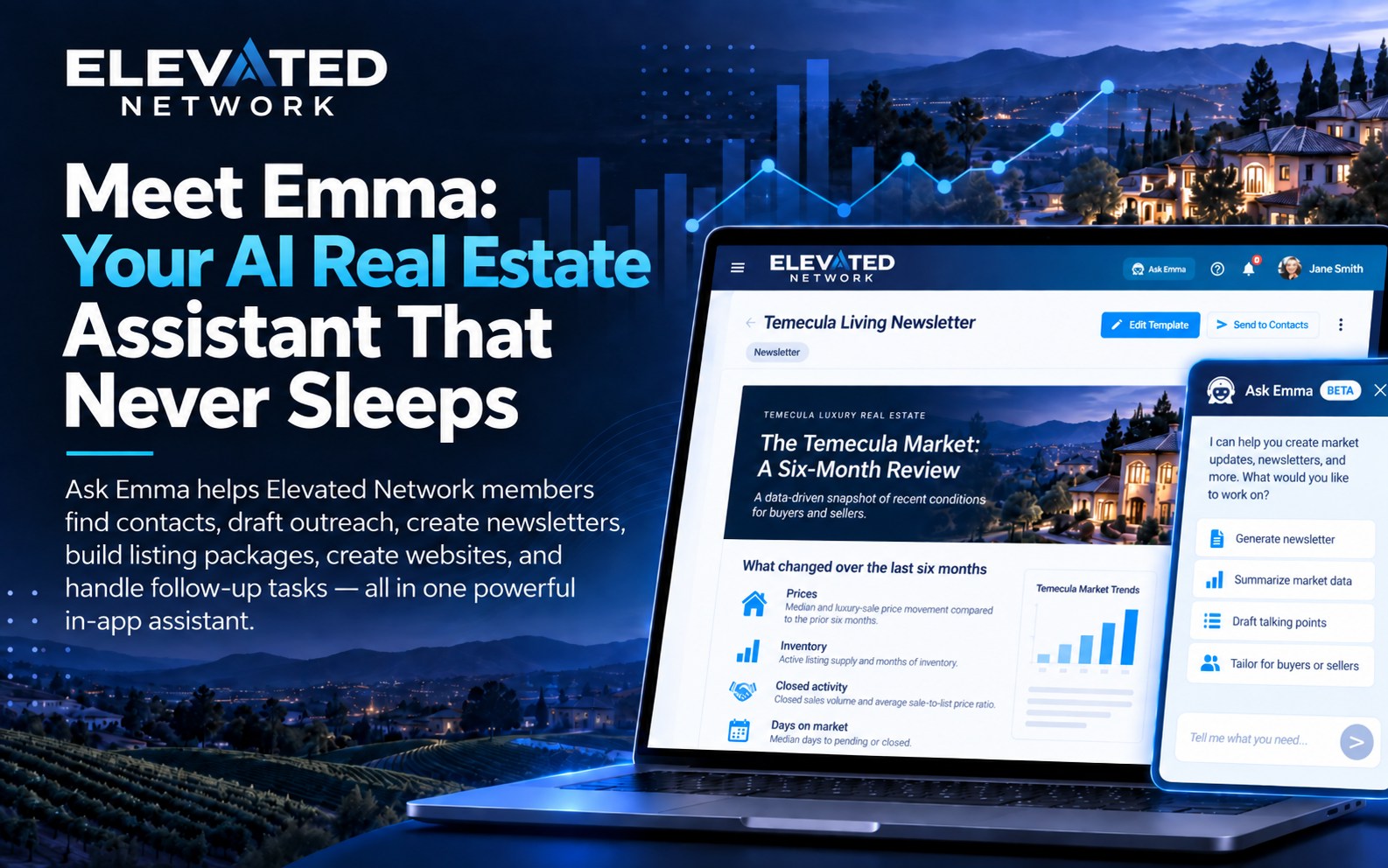
Emma is not a virtual assistant in another time zone, and she is not a generic chatbot with canned replies. Ask Emma is the in-app Elevated Marketing & Management Assistant. Members open her from Ask Emma in the top bar. She is part of membership and is rolling out to accounts now, so some members will see her before others.
She helps with contacts, marketing designs, website text, tasks, and platform how-tos. Requests that our team builds are part of the Marketing Assistant add-on, which costs extra.
What is Emma?
Emma lives inside Elevated Network. You talk to her in plain language. She can look up records, design emails and flyers, draft a blog post, open the right screen, and point you to knowledge-base articles.
Think of her as the teammate who already knows where things live in the platform:
- She works whenever you are in the app
- She keeps conversation history so you can pick up a thread
- She is included with Elevated Network (new-member pricing is $49.99/month), with a monthly allotment of Emma credits
- For after-hours phone help, you can also Call Emma 24/7 at (866) 582-Emma
What Can Emma Actually Do?
1. Contacts and CRM
The problem: You need a phone number, a birthday list, or a quick recap before a call, and you do not want to click through five screens to get there.
What Emma can do:
- Find a contact by name, email, phone, or tag
- Add a contact from a description (name, phone, email, address)
- Import contacts, including attaching a file
- Filter contacts (tags, birthdays, inactivity, or “everyone tagged LEAD”)
- Summarize a contact and give an interaction overview before a call
- Open the matching contact from a card
Example: “Find my contact Sarah Chen and summarize our last interactions before I call.”
2. Outreach
The problem: The email you meant to send still has no design.
What Emma can do:
- Design an email template from a description, with your photo, logo and details
- Ask you to pick contacts or tags when she needs to know who you mean
- Preview the design so you can approve it or ask for changes
- Save it to your templates when you say so
You stay in control. Emma designs and prepares. She does not text or email anyone. You send.
3. Marketing
The problem: A listing package, a flyer, or a newsletter design takes too many clicks when you are already between showings.
What Emma can do:
- File a listing package or open house kit request (from an MLS number) for our team to build, usually within 24 hours
- Design email templates and flyers, redesign one you already have, and export a PDF
- File a digital flyer email or text campaign request for our team to set up
- Open the preview she shows you
The welcome screen currently advertises shortcuts like Listing Package, Import Contacts, luxury newsletter, and filter by tag so you can start those jobs in one tap. Requests that our team builds are part of the Marketing Assistant add-on, which costs extra.
4. Websites and listings
The problem: The listing is live and your website still needs fresh text or a blog post.
What Emma can do:
- Rewrite the text on a page of your website, after you confirm
- Look up a listing, recent sales nearby, and market trends from the MLS
- Draft a blog post, saved as a draft for you to read and publish
- Open the page or blog draft she worked on
She cannot create a website, a page, a form, or navigation. You make those yourself under Websites.
Example: “Draft a blog post for first-time buyers in our market, then rewrite the welcome text on my home page.”
5. Tasks and calendar
The problem: Follow-ups live in your head until they don’t.
What Emma can do:
- Create follow-up tasks (“call tomorrow at 2”)
- Tell you which tasks are due today and what is on your calendar
- Open the task she created
6. Platform help (“How do I…?”)
The problem: You know Elevated can do it. You do not want to hunt through settings.
What Emma can do:
- Answer how-to questions (profile and photo, imports, reports, settings)
- Cite knowledge-base articles and open them
- Send you to profile, billing, or the right screen
That is everyday support inside the product, not a ticket queue.
7. The chat itself
Ask Emma is built for real work sessions, not one-off prompts:
- Keep conversation history; start or delete threads
- Dock the panel or leave it floating
- Attach files (CSV, Word, Excel, PDF, images; up to 5)
- Rate answers (thumbs up/down)
Ask Emma vs. Emma Requests
Ask Emma is the chatbot in the top bar.
Emma Requests is the form catalog in the sidebar: flyers, texts, drip adds, newsletters, lead websites, mailing labels, and more. It comes with the Marketing Assistant add-on, and our team builds what you request.
You can file four of those from chat: a listing package, an open house kit, a digital flyer email, and a text campaign. The full catalog still lives under Emma Requests. Use chat when you want to describe the work. Use Emma Requests when you want the structured form.
What members say
We do not publish fabricated case studies here. For real feedback, read Google reviews from Elevated Network members on our Member Reviews page.
A new lead from one of your forms can also get an automatic email reply. That is a separate lead-response setting, not Ask Emma chatting with buyers or booking showings. Call Emma 24/7 at (866) 582-Emma for AI phone support.
How Emma Compares
Ask Emma vs. doing it in the menus
| Factor | Ask Emma | Clicking through the platform |
|---|---|---|
| How you start | Plain language in one chat | Hunt for the right screen |
| Contacts | Find, add, import, filter, summarize | Manual search and forms |
| Marketing | Email and flyer designs; listing package requests to our team | Build each piece yourself |
| Websites | Page text and blog drafts | Editor and templates only |
| Follow-ups | Create tasks and show what is due today | Remember, then click |
| How-to help | Answers plus knowledge-base articles | Help center or a ticket |
Ask Emma vs. a generic chatbot
| Factor | Ask Emma | Generic chatbot |
|---|---|---|
| Where she lives | Inside Elevated Network | Usually a separate tab |
| Contacts and CRM | Find, add, import, filter, open records | Typically none |
| Marketing assets | Email templates and flyers saved to your account | Copy ideas only |
| Websites | Rewrite page text and draft a blog post | Cannot touch your site |
| Tasks | Create follow-up tasks | Reminders, if you are lucky |
| Appointment booking | Adds an event to your own calendar when you ask. Does not contact leads. | Usually none |
Ask Emma vs. a human marketing assistant
| Factor | Ask Emma | Human assistant |
|---|---|---|
| Cost | Included at $49.99/mo new-member pricing | Salary or hourly |
| Availability | Whenever you are in the app; Call Emma 24/7 | Business hours |
| Platform work | Contacts, marketing designs, website text, tasks, how-tos | Depends on training |
| Lead conversations | None. She does not text, email, or call anyone | They can call and text leads |
| Calendar booking | Tasks and events on your own calendar; no invites to leads | Can schedule if you allow it |
How to start a useful conversation
You do not need special commands. A strong prompt is usually action + item + details.
Try these:
- “Find my contact John Smith.”
- “Import the attached CSV into my contacts.”
- “Request a listing package for MLS 24001234.”
- “Request an open house kit for 123 Oak Street.”
- “Design a check-in email for my past clients.”
- “What has sold near 123 Oak Street in the last 90 days?”
- “Write a blog post for first-time buyers in our market.”
- “Create a follow-up task to call Maria tomorrow at 2.”
- “How do I update my profile photo?”
The welcome screen currently advertises shortcuts for Listing Package and Import Contacts, plus find a contact, luxury newsletter, filter by tag, add a contact, upcoming birthdays, follow-up task, and update profile & photo.
Common Questions About Emma
Q: Will my leads know they are talking to AI?
A: Ask Emma talks to you, not to your leads. She does not text, email, or call anyone. A new lead from one of your forms can get an automatic email reply. That is a separate setting.
Q: Can she book a showing on my calendar?
A: Not with the lead. She can create a follow-up task or add an event to your own calendar when you ask. She does not contact leads or send them calendar invites.
Q: Can she handle listing details?
A: She can look up a listing and recent sales from the MLS, and file a listing package request that our team builds from the MLS number, usually within 24 hours. Listing packages are part of the Marketing Assistant add-on. You review the result before anything is sent or published.
Q: What if she needs more information?
A: She will ask. For contact actions she may need you to choose among matching contacts. She may ask you to pick contacts or tags. Preview designs, then approve or ask for changes.
Q: Is she only for marketing?
A: No. She helps with contacts, marketing designs, website text, tasks, and how-to questions across the platform.
Q: What is the difference between Ask Emma and Emma Requests?
A: Ask Emma is the chatbot. Emma Requests is the sidebar form catalog (flyers, texts, drip adds, newsletters, lead websites, mailing labels, and more), which comes with the Marketing Assistant add-on. Four request types can start from chat. The full catalog is under Emma Requests.
Q: Can I attach files?
A: Yes. You can attach CSV, Word, Excel, PDF, and images (up to 5) for jobs like contact imports.
Q: Is the chatbot unlimited?
A: Ask Emma is included with membership, with a monthly allotment of credits. If you use them up, you can buy more or wait for the next monthly renewal.
Pricing: Emma is Included
Ask Emma is included with your Elevated Network subscription. You do not pay a separate chatbot fee. She is rolling out to accounts now. Requests that our team builds are part of the Marketing Assistant add-on, which costs extra.
Membership includes a monthly allotment of Emma credits. If you use them up, you can purchase more as needed, or wait until your next monthly renewal when the allotment refreshes. Email, SMS, and calling/dialer work the same way. Text and calling also require an Elevated phone number, which costs extra.
New-member pricing: $49.99/month
- Full CRM
- Email & SMS marketing
- Website builder
- Emma AI assistant (included, with monthly credits)
- Unlimited contacts
See Emma in Action
The best way to understand Emma is to use her in a real account.
Try these options:
- Start a trial - Open a free 14-day trial (opens in new window) and use Ask Emma in the top bar once she reaches your account
- See examples - See what you can ask Emma
- Call Emma - Phone support is available 24/7 at (866) 582-Emma
The Bottom Line
Emma is the assistant inside your platform, not a replacement for you on the phone.
She finds contacts, designs emails and flyers, drafts blog posts, sets follow-up tasks, and answers how-to questions so you spend less time clicking and more time with clients.
You still send the message. You still book the showing. Emma gets the work started.
Ready to Meet Your New Assistant?
Start your free 14-day trial of Elevated Network. Open Ask Emma in the top bar and try a flyer, a contact import, or a follow-up task. Emma is rolling out to accounts now, so she may reach yours a little later.
Start Your Free Trial → (opens in new window)
Card required to prevent spam; you will not be charged if you cancel before the trial ends. Cancel anytime in account settings.
Questions about Emma? Use Ask Emma in the platform, call (866) 582-Emma, or start a trial and try a real prompt.