What if you could:
- See pipeline counts and Pipeline Value before anyone else’s subject line
- Know whether you actually sent texts and emails this month
- Filter an Activity Feed to LEADS, TEXTS, TASKS, or Emma
- Search a contact by name, email, or phone from the top of the page
- Quick Add a hallway lead without opening the full People form
Inbox-first mornings feel productive. They are usually reactive. The 11 p.m. form waits until you “get to the CRM.” The task for today lives in another app.
My Dashboard is the opposite habit: open Elevated first. You need the Dashboards area in the sidebar (ask an admin if it is hidden). Empty cards are normal when there is no data. Full cards are a to-do list.
Ask Emma stays in the top bar. She does not replace the feed. She does not book the showing with your client.
What is My Dashboard?
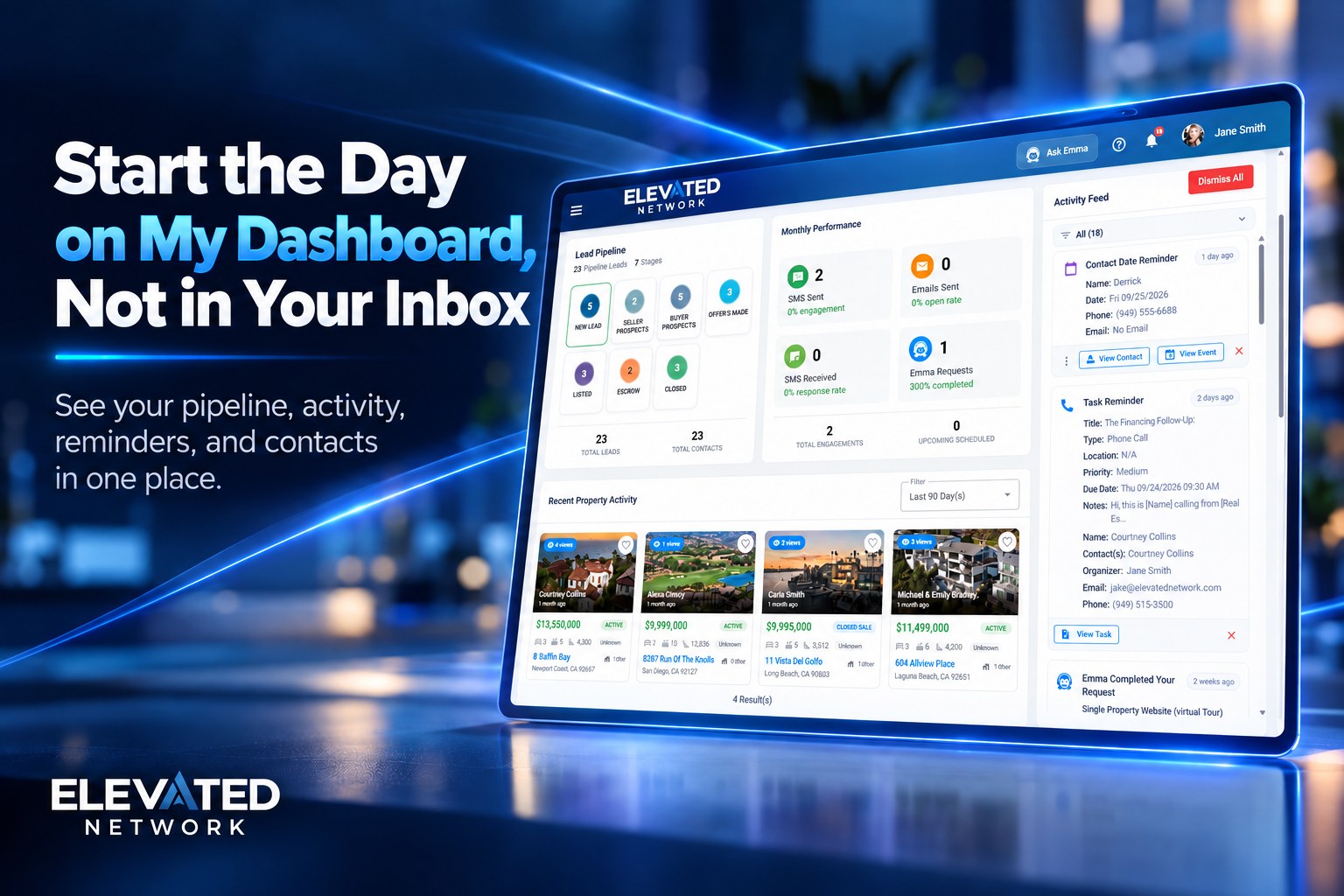
Dashboards → My Dashboard. Title uses your name when the platform has it. Top: Quick Search Contacts, New Contact, Refresh. Wide screens: Activity Feed on the right. Cards: Lead Pipeline, Monthly Performance (SMS sent and received, emails sent, Emma requests when enabled, total engagements, upcoming scheduled), Recent Property Activity (1–90 day filter).
1. Pipeline and performance at a glance
The problem: You find out the funnel is fat in New Leads at Friday’s meeting.
What you can do: Stage tiles with counts and dollars when you have values. Click a stage to focus. Monthly tiles tell you if you marketed or only meant to.
Example: New Leads fat, Qualified thin → today’s theme is conversations, not a new flyer.
2. Activity Feed is the urgent column
The problem: Pipeline value is interesting. A due call is urgent.
What you can do: Chips — ALL, LEADS, CALLS, TEXTS, TASKS, CALENDAR, Emma, PROPERTY — with counts. A task item → View Task. Dismiss one item, or Dismiss All only when you mean it.
Example: Filter TEXTS. Answer humans before you design anything.
3. Search and Quick Add
The problem: The hallway lead waits while you find People.
What you can do: Type a few letters. Open the drawer (email, call, map, message). New Contact → Quick Add for your contact type.
Example: First name, last name, Create Contact. Full form later if you need it.
How it compares
| Factor | My Dashboard | Inbox first | Another CRM home |
|---|---|---|---|
| Who decides the hour | Your funnel + feed | Someone else’s email | Varies |
| Add a contact | Quick Add | Later | Later |
| Emma | Top bar, same screen | Separate tab | Rarely |
We do not invent testimonials. See Member Reviews.
Stand-up with yourself
- Scan pipeline tiles.
- Filter feed to TEXTS or LEADS.
- Check Monthly Performance.
- Glance at property activity if you list.
- Refresh after a block of calls.
Do not treat it as wallpaper. If you only open templates, you will miss quiet leads.
Prospects: start a trial and open My Dashboard first.
Common questions
Q: Why is a card empty?
A: No records in that filter or date range. Normal.
Q: Does Emma run the dashboard?
A: No. She helps you do work. The cards reflect your account data.
Q: Is this extra?
A: Included on membership ($49.99/month new-member pricing) when Dashboards is visible.
The bottom line
Open Elevated first. Then go to email. You still take the appointments. The morning should not belong to whoever shouted last in your inbox.
Ready to start tomorrow here?
Sign in and use the stand-up list once. Prospects: start a 14-day trial and open My Dashboard first.
Start Your Free Trial → (opens in new window)
Card required to prevent spam; you will not be charged if you cancel before the trial ends. Cancel anytime in account settings.